
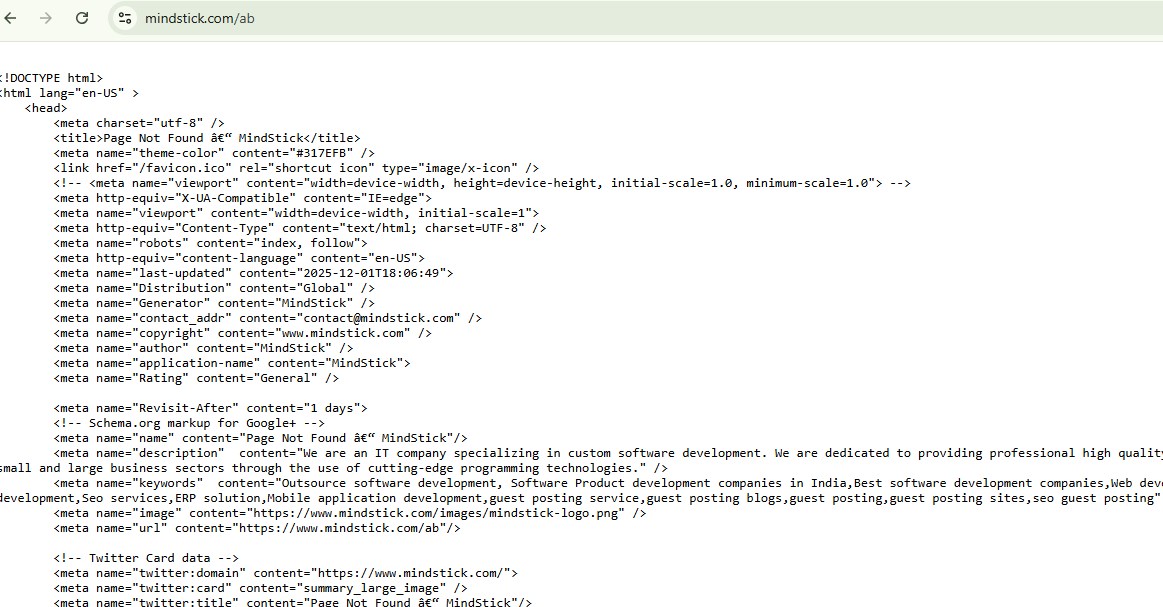
When opening a non-existing URL on MindStick.com (for example /ab,
/xyz, /test1), the website does not show a standard 404 Not Found page. Instead, it displays the
HTML source code directly in the browser, as shown in the screenshot. This behavior is unusual and raises questions about website safety, configuration, and SEO.
What Exactly Is Happening?
Instead of rendering the HTML page visually, the browser is receiving the page as
plain text.
This usually happens when:
1. Wrong MIME Type (Content-Type Header Issue)
The server might be sending:
Content-Type: text/plain
instead of:
Content-Type: text/html
Because of this, the browser thinks the response is text and shows it as-is.
2. Broken Server Routing or Error Handler
The website’s backend may not be configured correctly to deliver a 404 template.
So instead of:
A designed 404 page
the server sends:
Unprocessed 404-template HTML code
3. A Developer Forgot to Enable View Rendering
Sometimes developers output the template string but forget to allow the HTML engine (ASP.NET, PHP, Node, etc.) to interpret it.
Is This Safe?
This is NOT fully safe.
While it does not show sensitive passwords or backend code, it still exposes:
Internal meta tags
Page structure
URL routing behavior
Server-side template handling patterns
Possible Risks:
• Information disclosure – Hackers can study how errors are generated.
• Search engine confusion – Google may index this broken page as duplicate content.
• SEO issues – Because the page does NOT return a clean 404, Google may treat it as “Soft 404” or low-quality content.
• User trust issues – A normal user will think the website is broken or compromised.
Is It Dangerous for Users?
For general visitors:
No major personal security risk.
For website owners:
Yes, it indicates a configuration problem that should be fixed immediately.
Why Should Website Owners Fix It?
1. Bad for SEO
Google expects a proper 404 page.
This one may be treated as:
Soft 404
Thin content
Low-quality fallback page
2. Bad User Experience
Users think the site is hacked or unstable.
3. Security Best Practices Violated
A website should never leak raw templates or code.
Conclusion: Is This Safe?
No — this is not safe or normal.
It is not extremely dangerous for end-users, but it is a sign of:
Misconfigured server
Incorrect MIME type
Broken 404 handler
A professional website should always display a properly rendered 404 page.


Leave Comment